
Datasheet Intelligence
Every register value, cited to the manual
Embedder reads the entire reference manual, from register maps to clock trees to errata, and cites the section behind every value it writes.
Embedder is an AI platform for firmware that solves board bring-up, hardware debugging, HIL testing, platform migrations, and performance optimization.
Our semiconductor and integration partners help connect Embedder to the chips, instruments, and systems that power the physical world.










Embedder reads your datasheet and schematic, drafts a cited implementation plan, writes part-specific drivers, and validates them on your hardware and existing bench equipment—cutting weeks of bring-up work down to days.
Every register value, cited to the manual
Embedder reads the entire reference manual, from register maps to clock trees to errata, and cites the section behind every value it writes.
Drivers that match the board you built
Embedder resolves your netlist against the datasheet: pin muxing, pull-ups, bus addresses, errata workarounds. Nothing is assumed from the vendor's dev kit. Every driver is grounded in your actual design.
Embedder investigates firmware bugs across code, schematics, and live hardware. It drives the bench, tests hypotheses, and attaches hardware evidence—serial traces, register dumps, and schematic context—to every root-cause conclusion.
Diagnosed against what the chip did
Embedder reads serial output and drives GDB sessions, stepping breakpoints, inspecting registers and memory, and correlating runtime state with the code under review. Failures get diagnosed against what the chip actually did.
Signals as reviewable evidence
Embedder turns logic analyzer captures and oscilloscope waveforms into structured data. Timing violations, protocol errors, and signal integrity issues surface as reviewable evidence, grounding firmware changes in electrical behavior.
Every microamp traced to a line of code
Embedder drives power profilers to capture current draw across a workload, correlates the high-draw windows back to what the firmware was doing, and proves every low-power change by re-measuring on real silicon.
Embedder generates tests from your hardware docs, runs them on real probes and instruments, and diagnoses failures against firmware and live signals. It proposes a fix, then reruns the test on silicon.
Divide test work across specialized agents
Embedder splits a firmware test campaign across specialized agents that run cases concurrently and merge pass/fail results.
Build, flash, test, and fix autonomously
The orchestrator chains compilation, flashing, runtime observation, and code repair into a tight loop. When a test fails the agent diagnoses the fault, patches the source, and re-validates without human intervention.
Roll Embedder out across every firmware team, with the controls your admins need and the security posture your reviewers expect.
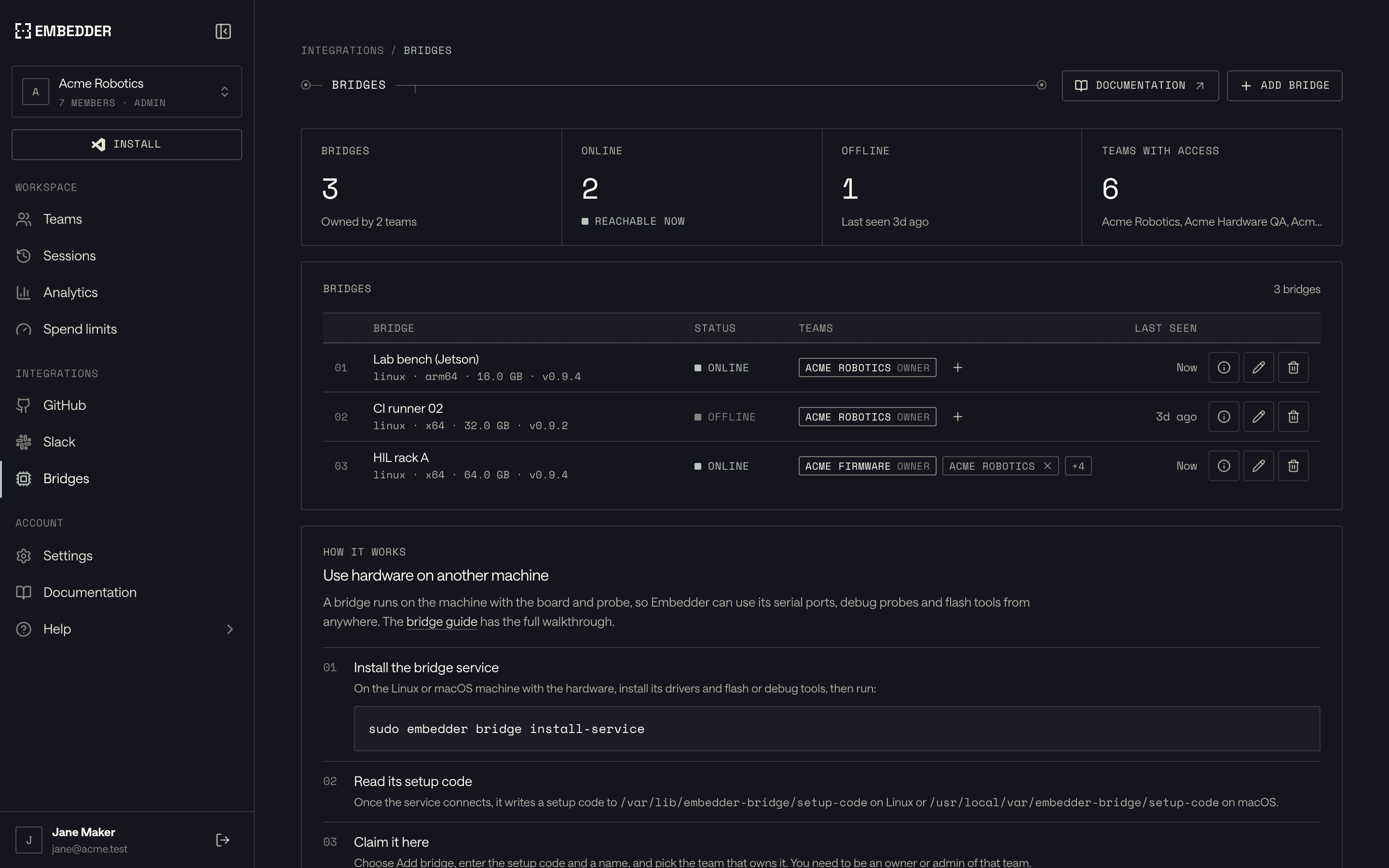
Run every team from one workspace. Admins see usage across the organization, set spend limits per member, and share bench hardware with the teams that need it.
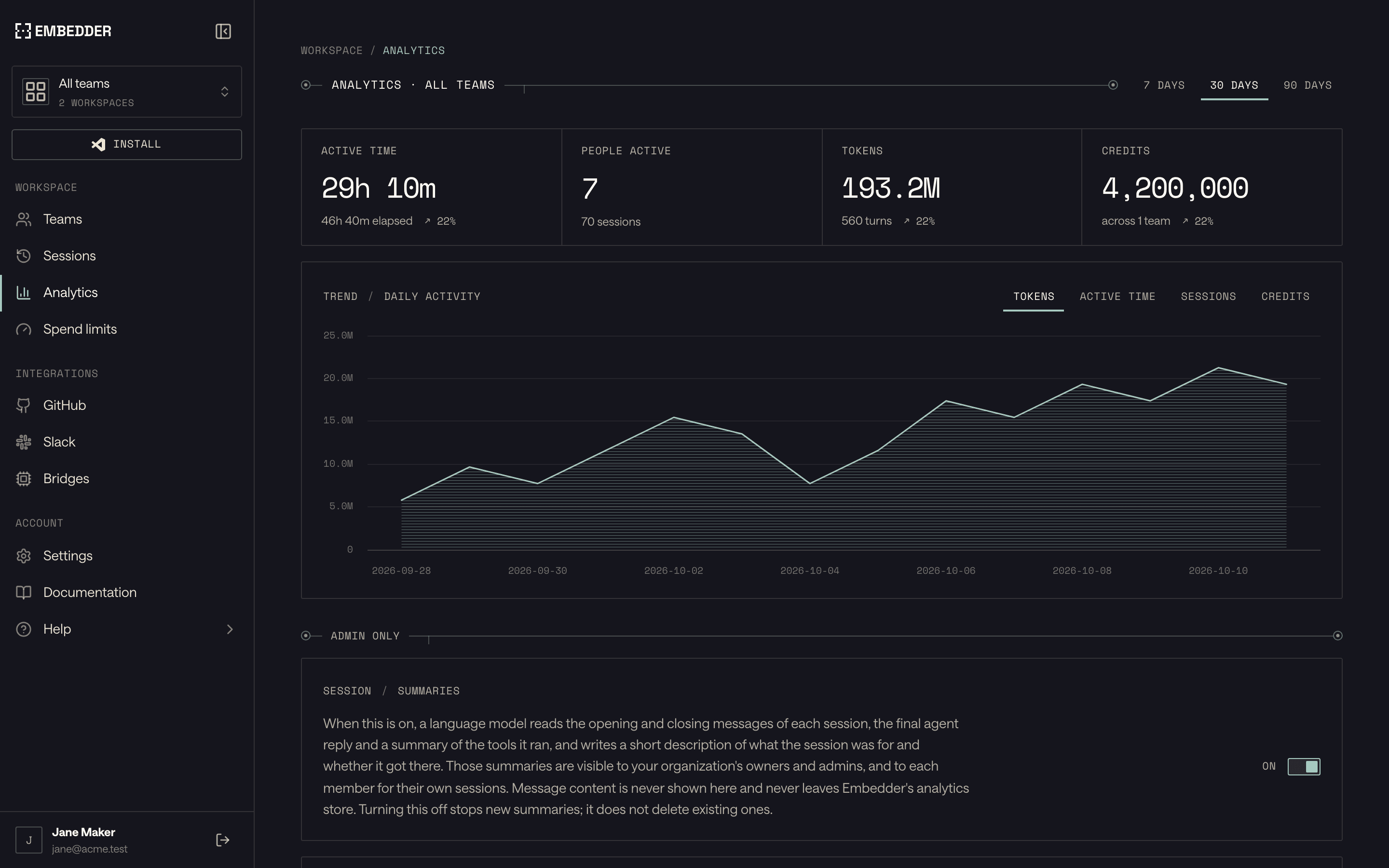
Every team's usage in one view
Active time, tokens, and credits for every team, member, and session, with the trend behind each number.
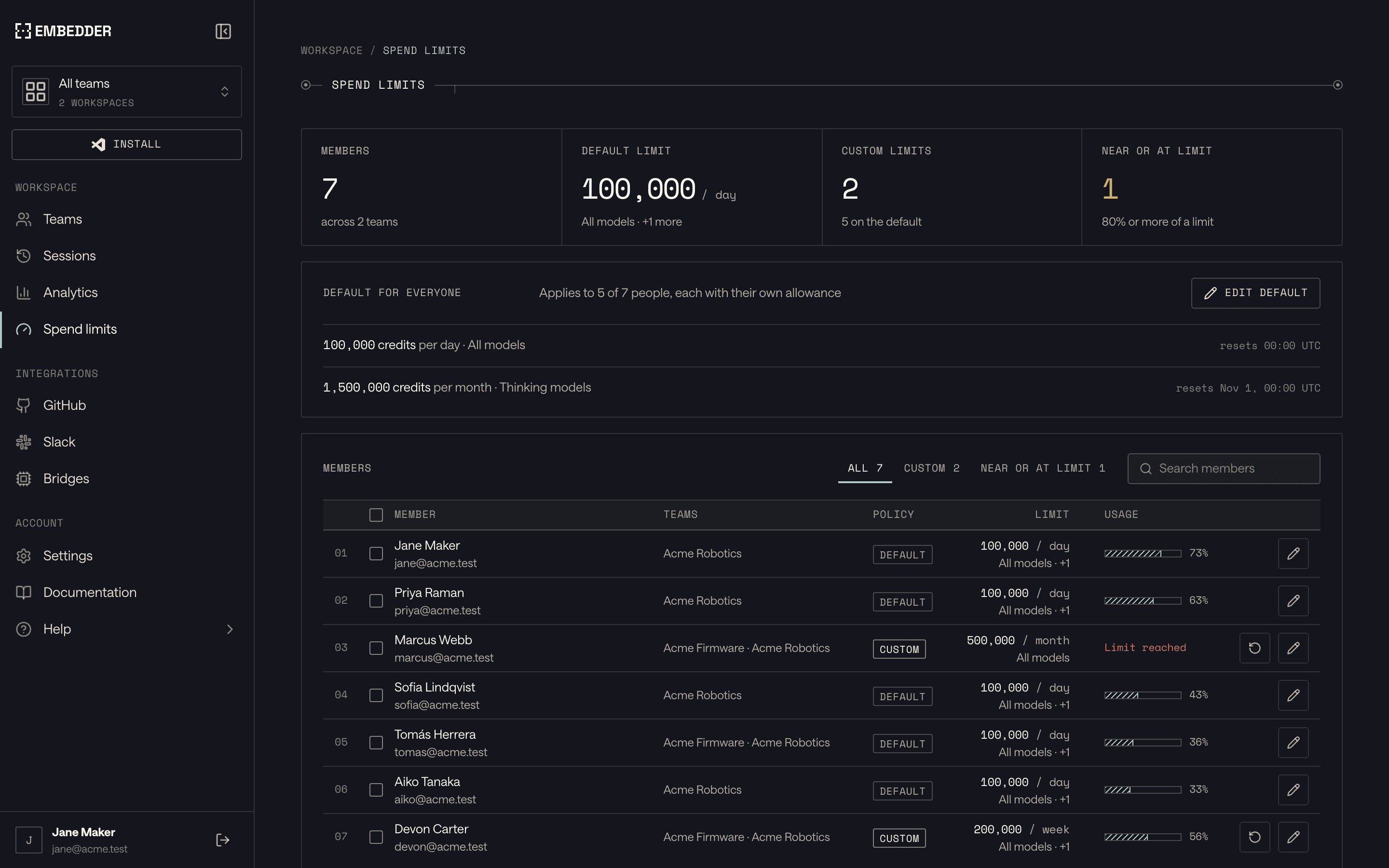
Credit limits for every member
Give everyone a default allowance, then set custom daily, weekly, or monthly limits for the people who need more.
Lab hardware, shared across teams
Bridges put bench machines and HIL racks on Embedder, so the teams you grant access can use their probes and flash tools from anywhere.
Embedder operates on your most sensitive IP: schematics, source code, and live bench access. It is built to clear security review, and it runs wherever your policy requires.
SOC 2 Type II
Independently attested security, availability, and confidentiality controls across our infrastructure, code, and customer data handling.
ISO 27001
A formal ISMS covering risk, access, and incident response, with data minimization and DPA support.
On-Prem / BYOC
Run Embedder fully on-premise or bring your own cloud. Ensure your IP, schematics, and source code never leave infrastructure you control.
General-purpose assistants can help write code. Embedder adds the firmware-specific evidence, toolchain, and hardware loop needed to test whether that code matches the actual part and board.
Depends on context supplied by the user
Indexed manuals, datasheets, errata, and SVD files
Schematics and live signals must be supplied manually
Native schematic ingestion and hardware signals
No native firmware bench loop
Integrated HIL/SIL and instrument control
External traceability and evidence process required
Traceability and evidence workflows for regulated industries
Separate tooling and manual handoffs
Integrates with enterprise-grade static analysis tooling
Repository context varies by tool and session
Project, toolchain, hardware, and documentation together
| Capability | General-purpose coding AI | Embedder |
|---|---|---|
| Documentation grounding | Depends on context supplied by the user | Indexed manuals, datasheets, errata, and SVD files |
| Board context | Schematics and live signals must be supplied manually | Native schematic ingestion and hardware signals |
| Verification | No native firmware bench loop | Integrated HIL/SIL and instrument control |
| Compliance workflows | External traceability and evidence process required | Traceability and evidence workflows for regulated industries |
| Static analysis | Separate tooling and manual handoffs | Integrates with enterprise-grade static analysis tooling |
| Project context | Repository context varies by tool and session | Project, toolchain, hardware, and documentation together |
Hardware fit, verified workflows, data handling, and deployment.
Embedder's catalog covers 600+ platforms from 14 chip and board manufacturers, including ST, NXP, Nordic, Espressif, Infineon, Renesas, Silicon Labs, TI, Microchip, XMOS, and Raspberry Pi, plus 5,800+ peripherals: sensors, radios, power, drivers, converters, displays, memory, connectors, and more. Enterprise teams can add custom platforms and peripherals from their own documentation and target details.
Embedder flashes and debugs through SEGGER J-Link and J-Trace, ST-Link and CMSIS-DAP via OpenOCD, probe-rs, TI XDS, and XMOS xTAG. On the bench it drives Saleae and DSLogic logic analyzers, Digilent WaveForms devices, Nordic PPK2 and Joulescope power analyzers, PicoScope and Siglent oscilloscopes, and SCPI scopes from Rigol, Tektronix, Keysight, Rohde & Schwarz, Teledyne LeCroy, and GW Instek. It also works with CAN adapters and Bluetooth LE devices, and hardware scripts and MCP servers extend it to custom rigs.
Altium, KiCad, Eagle, PADS, and Xpedition, plus EDIF exports. Embedder parses native design files into board context, including components, pins, nets, buses, device addresses, and power topology, so the firmware reflects the board you built. Startup includes Altium and KiCad schematics; Enterprise adds Xpedition, PADS, and Eagle.
C, C++, and Rust across bare-metal and RTOS projects. Embedder works with the stacks already in your repository, including FreeRTOS, Zephyr, nRF Connect SDK, ESP-IDF, STM32Cube, MCUXpresso, Renesas FSP, and PlatformIO.
Yes. Embedder works on embedded Linux as well as microcontroller firmware. Linux targets such as Raspberry Pi computers and Compute Modules use the same repository, documentation, toolchain, and hardware context as MCU projects, and teams can build, deploy, and test on the board from the same loop. Enterprise teams can add other application processors from their own documentation and target details.
Embedder brings your codebase, hardware documentation, schematics, toolchain, and live board into one engineering loop. It carries a task from understanding the requirement through implementation and physical verification, using each build, serial log, debugger state, or instrument capture to guide the next step. The result is a reviewable change backed by evidence from the target hardware.
Embedder writes and runs checks at the layer that proves the change: host tests, target builds, flash-and-observe checks over serial, GDB checks, or instrument captures. When a check fails, it diagnoses the cause, proposes a fix, and reruns the check on the board. Reusable hardware scripts live in your repository and run from chat, VS Code, or the CLI, and each hardware case keeps its commands, captures, and pass/fail evidence with the project.
No. Embedder works in your existing repository with the compiler, build system, flasher, debugger, and RTOS you already use. The VS Code extension is the primary interface and also runs in Cursor and Windsurf. The CLI brings the same project context to the terminal and your own test pipelines, and its daemon picks up work from GitHub and Slack, including pull request review and autofix.
Yes. A bridge runs on the Linux or macOS machine attached to the hardware, such as a bench PC or HIL rack, and makes its serial ports, debug probes, and flash tools available in Embedder. Team admins claim the bridge in the Embedder app, and the team can then select it from chat to flash, debug, and test from anywhere.
Engineers define the task and can review or edit a plan before any code changes. Every edit lands as a pending change to keep or undo. Approval modes decide which commands and actions run without asking, project rules can require approval but never grant it, and protected files stay off-limits even when approvals are skipped. Hardware access stays arbitrated throughout.
Embedder indexes the datasheets, reference manuals, errata, SVD files, and schematics for your hardware, works from them, and cites the sections behind hardware-specific decisions. Every file edit is checked against the part's SVD, flagging unknown peripherals, registers, and addresses, writes to read-only registers, and reads from write-only ones. Behavior the documents can't settle, such as clocks, timing, and power sequencing, is verified on the target hardware.
Embedder treats hardware access as a controlled operation. Flashing and erasing ask for approval unless you choose otherwise, and an exclusive hardware lease queues sessions and subagents so only one drives a board or probe at a time. You can inspect or release the queue whenever you need to.
You keep ownership of the source code, schematics, documents, and data you submit. In Embedder's cloud, that content is processed to provide the service, including by the AI model providers that run your requests. On paid plans, neither Embedder nor its model providers use your inputs, outputs, uploaded content, or related data to train, fine-tune, improve, or develop AI or machine-learning models. Enterprise teams can also deploy single-tenant, in their own VPC, or on-premises, including air-gapped installs with local models, so the work stays inside infrastructure they control.
A firmware repository, VS Code 1.106 or later (Cursor and Windsurf also work), a representative board with its documentation, and your normal flash or debug connection. Choose Try Free to sign in and install the extension, open Embedder Chat, then pick your board and peripherals and add schematics if you have them. Run /init to record how the project builds, tests, flashes, and debugs in EMBEDDER.md, then open the Monitor and connect to the board for live verification.
Embedder offers Free, Startup, and Enterprise plans. Free is for individual, non-commercial use. Startup adds commercial use, the full hardware catalog, and shared team credits. Enterprise adds unlimited seats and credits, custom platforms, and private deployment. Start on Free yourself, or contact us for Startup and Enterprise.